- Clocks are square wave signals of certain frequencies
- Selecting the right kind of clock for your application is important; there is a proportional correlation between power consumption and frequency
- As clock frequency determines how fast the CPU can execute instructions, e.g. for a low-powered application we can use a lower frequency
- The clock signal needs to be derived from clock sources. E.g. for STM32F407 Discovery Board, the three available clock sources are:
- Crystal Oscillator: this is an external component that needs to be connected to the microcontroller. This generates HSE (High Speed External signal)
- RC (Resistor/Capacitor) Oscillator: a moderate accuracy circuit already inside the microcontroller. This generates HSI (High Speed Internal signal)
- PLL (Phased Locked Loop): a high-accuracy circuit that generate higher frequency clock by multiplying the frequency of an input clock, also already inside microcontroller. This can be boosted to a higher speed than HSE or HSI.
- PLL takes a source, either HSI or HSE, then multiplies the clock speed.
- We can use one of these sources to drive the clock for the microcontroller
- Some peripherals may need to run at a lower clock rate; we can use prescalers to divide HCLK from AHB bus
HSE Clock
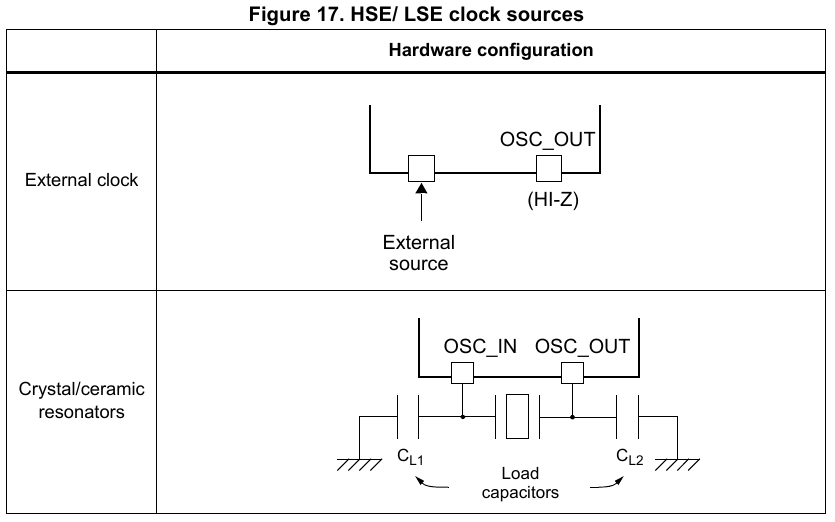
- External clock does not require crystal oscillator, we connect the external clock by deriving an external source such as another MCU, circuit, or another part of the PCB, etc.
- Often, crystal oscillators are already included on Development Boards, but not on microcontrollers.
- On STM32-DISC boards, HSE is provided by the on-board crystal.
- Nucleos use ST-LINK circuitry to supply HSE signals (Bypass). ST-Link has its own microcontroller from which we can pull the 8 MHz clock.
HSI Clock
- After power or system reset, HSI clock is used as default system clock. Note that if there is no external clock, the microcontroller will have to use HSI.
- HSE and PLL have to be enabled in the code first, otherwise they are “dead”.
Peripheral Clock Configuration
- Clock configuration registers hold bit flags, e.g. clock source enabled/disabled, prescalers; clocks for various domains such as APB, AHB, memory domain
- In modern MCUs, before using any peripheral, we must first enable its peripheral clock with peripheral clock registers
- First find out what bus the peripheral is connected to using the datasheet, and then find the corresponding clock enable register for that bus
- Default behaviour is peripheral clocks of most peripherals are disabled to save power; a peripheral won’t respond to configuration values until its configuration clock is enabled
- In STM32 MCUs, peripheral clocks are managed through RCC registers
- E.g. ADC register
- Add the address offset to the base address
[1] https://stackoverflow.com/questions/40214987/stm32-internal-clocks